Curve Green Background: A Modern Geometric Design Asset
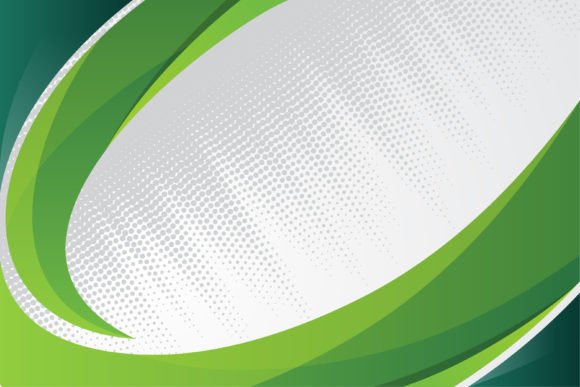
When you're building a brand, a presentation, or a social media campaign, the backdrop matters more than most people realize. It sets the mood, frames your content, and communicates professionalism before a single word is read. The Curve Green Background is a minimalist geometric vector illustration designed to do exactly that—provide a dynamic, polished foundation for a wide range of creative projects. With its flowing shapes, halftone dot patterns, and a multicolor green palette accented by grey gradients, this design asset brings modern energy to any layout without competing for attention.
What Makes This Background Stand Out
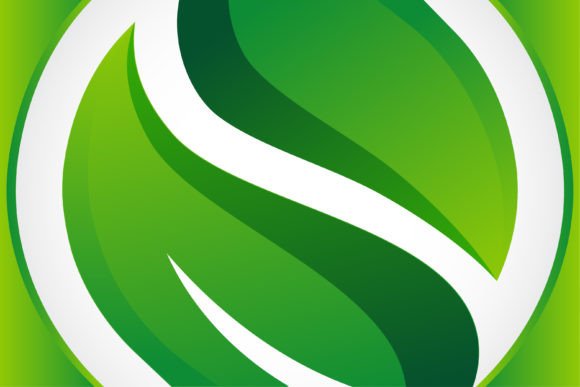
At first glance, the Curve Green Background feels fluid and alive. The composition relies on smooth, sweeping curves and geometric shapes arranged in a horizontal layout. Diagonal dot halftone patterns weave through the design, creating depth and subtle texture that catch the eye without overwhelming it. The color story centers on multiple shades of green—ranging from soft sage to vibrant emerald—layered with grey gradients that add sophistication and balance.
What gives this backdrop its personality is the interplay between structure and motion. The geometric elements feel deliberate and organized, yet the curves introduce a sense of movement and natural flow. It's the kind of design that suggests technology and nature coexisting, which makes it surprisingly versatile. Whether you're working on a tech startup's brand identity or an eco-conscious product launch, the visual language adapts to your message.
Every element in this file is 100% vector, meaning you can scale it from a small web banner to a large-format poster without losing a pixel of clarity. At 300dpi resolution, it's print-ready from the moment you download. The file comes well organized with editable text, shapes, and colors, so you're not locked into the original palette or arrangement. You'll receive Ai, EPS, JPG, and SVG formats, covering virtually every design software and use case.
Where This Design Asset Works Best
The real strength of the Curve Green Background lies in its adaptability. Here's where it fits naturally into professional and creative workflows:
Brand Identity and Logo Design: If you're developing a brand that wants to signal freshness, growth, or innovation, this background pairs beautifully with clean sans serif typography and bold logo marks. It works as a presentation slide backdrop, a business card texture, or a website hero section that immediately communicates modern design sensibility.
Web Design and Digital Platforms: The horizontal layout and subtle gradients make it ideal for website headers, landing page sections, and app splash screens. The green tones feel welcoming on screens, and the geometric patterns add visual interest without slowing down page performance—especially when optimized as SVG.
Social Media Graphics and Marketing: Content creators and marketers need backgrounds that make text pop and images stand out. This asset provides enough visual texture to feel premium while remaining neutral enough to support overlaid content. Use it for Instagram story templates, LinkedIn banner images, Facebook cover photos, or YouTube thumbnails.
Presentation and Editorial Design: Entrepreneurs and small business owners often struggle with making slide decks look professional. This background transforms a plain presentation into something that feels intentional and polished. It also works well as a chapter opener or section divider in editorial layouts, magazines, and digital publications.
Packaging and Print Projects: The 300dpi resolution and vector scalability mean you can confidently use this for product packaging, brochure covers, event posters, and printed marketing materials. The halftone dot pattern adds a tactile quality that translates beautifully to print.
How to Evaluate If This Background Fits Your Project
Before committing to any design asset, it helps to think through a few practical questions. Start by considering your project's tone. The Curve Green Background leans modern, clean, and slightly tech-forward. If your brand identity is warm, rustic, or heavily traditional, this particular style might feel disconnected. But if your audience responds to contemporary aesthetics—think tech companies, wellness brands, creative agencies, or educational platforms—it's a strong match.
Next, think about visual hierarchy. A good background supports your foreground content rather than fighting with it. Because this asset uses soft gradients and muted grey tones alongside the greens, it creates natural breathing room for headlines, body copy, and images. Test it by placing your actual content on top—your logo, your text blocks, your product photos—and see if the composition still feels balanced.
Font pairing also matters when working with a textured backdrop. Clean sans serif fonts tend to work best here, as they echo the geometric precision of the design without adding visual noise. If you prefer a serif font for elegance or a handwritten font for warmth, test the combination at actual size to confirm readability. The halftone pattern is subtle, but it does add texture, so very thin or ornate typefaces might lose legibility at smaller sizes.
Color customization is another advantage worth exploring. Since the file is fully editable, you can shift the green palette to match your brand's exact color codes. You might deepen the greens for a more corporate feel, brighten them for a youthful audience, or even convert the entire palette to blues or purples if the green doesn't align with your existing brand identity. The underlying geometric structure and halftone pattern will still carry the design's modern personality regardless of color changes.
Practical Tips for Using This Asset Effectively
When incorporating the Curve Green Background into your work, a few small adjustments can make a big difference in the final result.
First, consider opacity and blending. If the background feels too prominent, reduce its opacity or apply a subtle overlay. This is especially useful in web design, where a slightly faded backdrop can make navigation elements and calls to action more prominent.
Second, use the included formats strategically. The SVG version is perfect for web use because it stays sharp at any screen resolution and loads efficiently. The Ai and EPS files give you full editing control in Adobe Illustrator or compatible software. The JPG works well for quick mockups, social media posts, or situations where you need a ready-to-use image without opening design software.
Third, don't overlook the power of consistency. If you're building a brand, using this background across multiple touchpoints—your website, your email headers, your presentation slides, your social profiles—creates a cohesive visual identity that audiences begin to recognize. That kind of consistency builds trust and professionalism over time.
Finally, remember that great design assets are starting points, not finished products. The Curve Green Background gives you a strong, modern foundation, but the real magic happens when you layer your own creative decisions on top of it. Experiment with cropping, rotating, or combining it with other design elements. The vector format means you can break apart the shapes and repurpose individual elements as icons, dividers, or accent graphics throughout your project.
Whether you're a designer building a client's brand, an entrepreneur crafting a pitch deck, or a content creator refreshing your visual style, this geometric green backdrop offers the kind of flexibility and polish that elevates everyday projects into something memorable.